New and Noteworthy
Welcome to the new and noteworthy pages.
New and Noteworthy in MiWorkplace V1.38.0
Issues resolved
- No news yet
New and Noteworthy in MiWorkplace V1.37.0
Other issues resolved
- I03777 - Remove Licensing
- MiWorkplace
- Licensing was removed. Miworkplace is freeware in 1.37.0
- Removed Ai Chat
- the Ai Chat client was removed from MiWorkplace
- Moved to Jakarta namespace
- We moved from the javax to the jakarta namespace
New and Noteworthy in MiWorkplace V1.36.0
Other issues resolved
- 00168 - Add syntax highlighting for the latest RPG language elements
- Added all the latest BIFs, Operation codes and Keywords to the syntax highlighter.
- I02675 remove japanese translation from build and repo
- The Japanese help text translations were out of date and have been removed.
- 02084 - Error during loading of members in source file
- For large sourcefiles, MiWorkplace could get confused.
New and Noteworthy in MiWorkplace V1.35.0
Other issues resolved
- 00167 - MiWorkplace Editor Issue
- Fixed the issue where a NullPointerException is happening when the compile result view didn't initialize correctly after a compile and that exception is thrown from that view when an editor is having focus or a file is selected in the main tree.
- I02748 - Delete compile result button not working in MiWorkplace
- Fixed the delete compile result button in the toolbar of the compile result view that was not working in MiWorkplace.
New and Noteworthy in MiWorkplace V1.34.0
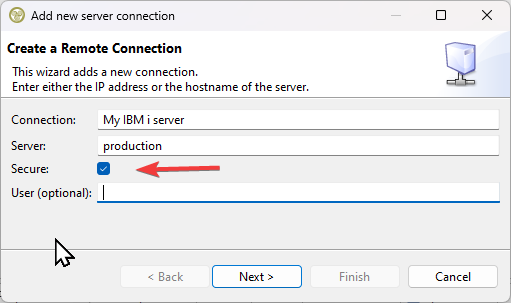
| Secure Connections | We have added a new setting for secure connections to the server configuration. It uses strong encryption and authentication to protect data, making it impossible for people to access your data by sniffing the connection.
|
|---|
New and Noteworthy in MiWorkplace V1.33.0
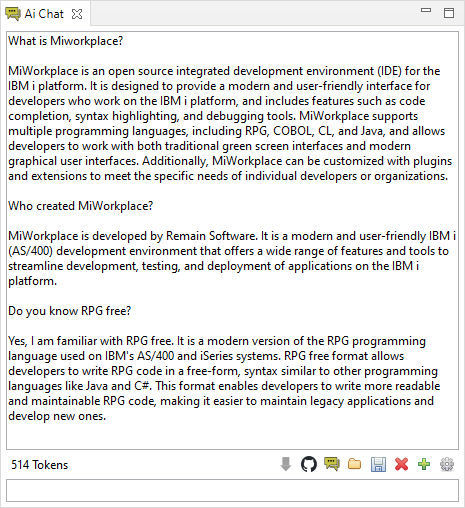
| Ai Chat Included | Introducing Remain Ai Chat by Remain Software, the ultimate AI chatbot that simplifies coding and documentation tasks in Eclipse. Its intuitive Ai Chat View and ChatGPT interface provide a seamless experience for developers and technical writers. This tool leverages the power of AI to provide contextual suggestions, code snippets, bug checking, and documentation proposals, empowering you to write code faster and more efficiently. Whether you're a seasoned developer or just getting started, Remain Ai Chat is the perfect companion to take your coding and documentation skills to the next level. Try it out today and see why Remain Ai Chat is MiWorkplace's go-to AI chatbot.
|
|---|
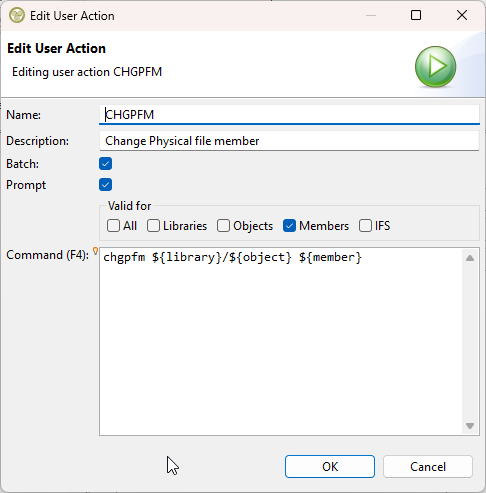
| E241 - MiWorkplace : Make user actions promptable | We are pleased to announce some valuable updates to user actions in MiWorkplace that will enhance your workflow. Take a look at the following improvements:
1�⃣ Promptable User Actions: User actions are now promptable, allowing you to execute actions with a simple click instead of typing them manually. 2�⃣ Command Prompting on Addition: When adding a user action, you can now prompt the command, making it easier to set up and modify actions on the go. 3�⃣ Improved Variable Insertion: Enjoy better support for variable insertion, making it more convenient to integrate and automate actions with variables. 4�⃣ Execute on Multiple Entries: Save time by executing user actions on multiple entries simultaneously. Perform actions across a batch of items efficiently. 5�⃣ Type-Specific Selection: Customize your user actions by selecting them for specific entry types. Tailor your workflow to match your needs.
|
|---|
== Other issues resolved ==
New and Noteworthy in MiWorkplace V1.32.1
| 00154 - Upgrading to a new release, fails. | We have released 1.32.1 to remedy this. The internal upgrade mechanism was broken, and some could not upgrade to the latest release. The issue does not always show, but if it does, the upgrade must be done by downloading a fresh copy of MiWorkplace from https://miworkplace.com/index.php?content=download
After download:
|
|---|
New and Noteworthy in MiWorkplace V1.32.0
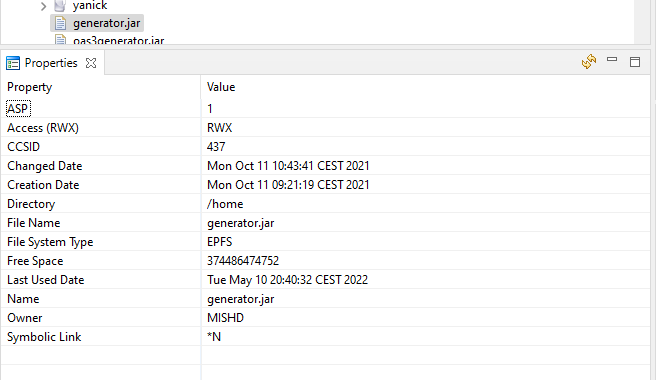
| E240 Display stream file properties in Properties view | Support was added for IFS file properties.
|
|---|
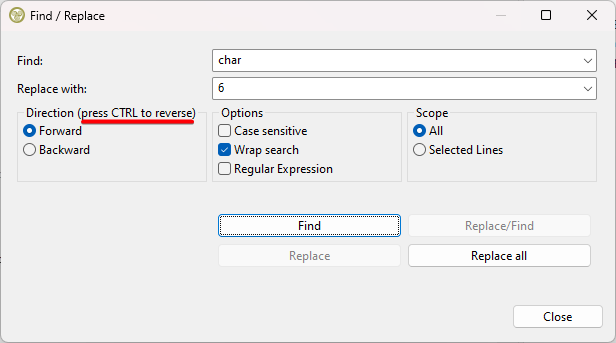
| 00146 - Find (Ctrl F) opens on a different display is too big | We gave the search function some love and we fixed the following:
|
|---|
Other issues resolved
- 01839 - Error when opening new source member
- A new member could not be opened because it had no records. This was solved.
- 01842 - User action auto-complete for stream file path incorrect
- We have added support for the path variable in the user actions. It has the same value as ${ifspath}. The documentation was updated.
- 00149 - Prompting stopped working in Java 19
- The Swing classes of jt400 to prompt commands stopped working in java 19. We have reverted our JVM to Java 17.
New and Noteworthy in MiWorkplace V1.31.0
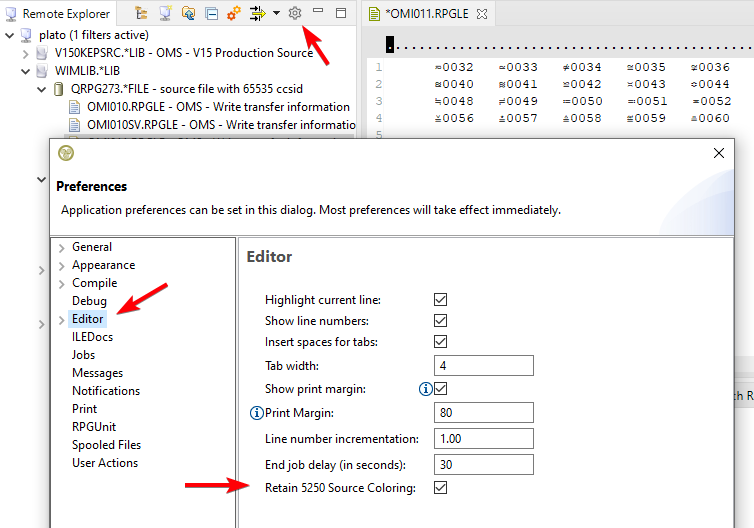
| E053 - Add support for SEU source colors | We have added support for retaining the control characters that control the coloring of source lines in 5250 editors. The new behavior must be switched on in the MiWorkplace Preferences.
≂ - \U2242    Green
≃ - \U2243    Green/Reverse Image
≄ - \U2244    White
etc..
|
|---|
Other issues
- 00141 - The outline does not show files correctly
- In RPGLE Fixed format, the filename of 10 positions would not display correctly in the outline. This has been fixed.
- 00142 - Editors are opening in the wrong place
- When the outline is dragged out of the main window and docked back again in the editor area, the program cannot find the correct part stack anymore to open files. Instead, the editor would open in a random spot. This has been fixed.
New and Noteworthy in MiWorkplace V1.30.0
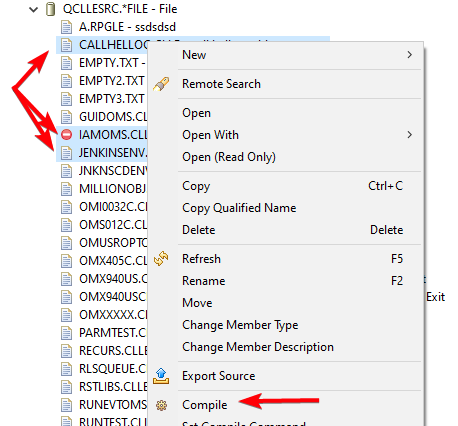
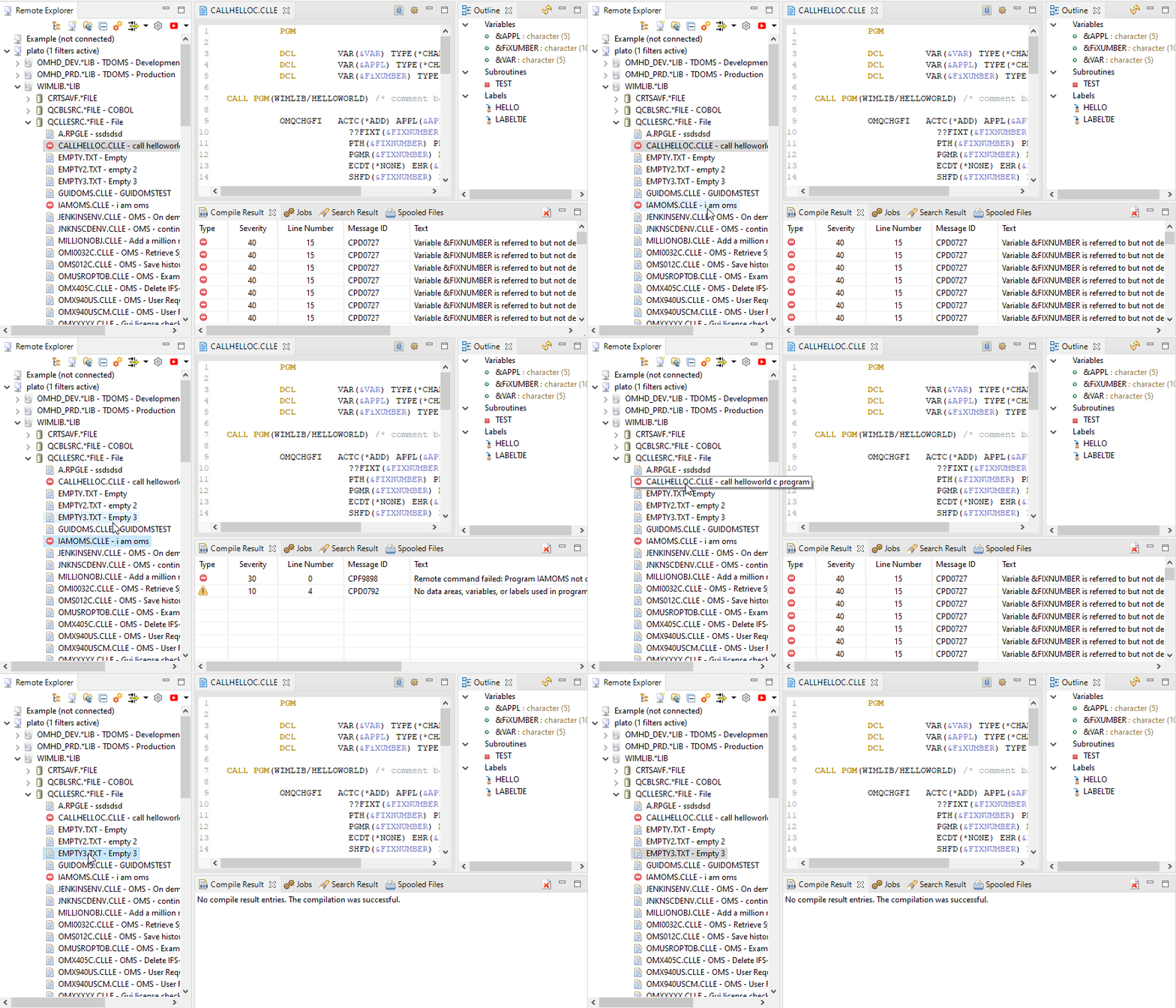
| E050 Allow for more than 1 compile at a time | Multiple sources can be selected for mass compilation.
|
|---|
| E050 Last compile result is indicated in the remote explorer tree | Last compile result is indicated in the remote explorer tree.
|
|---|
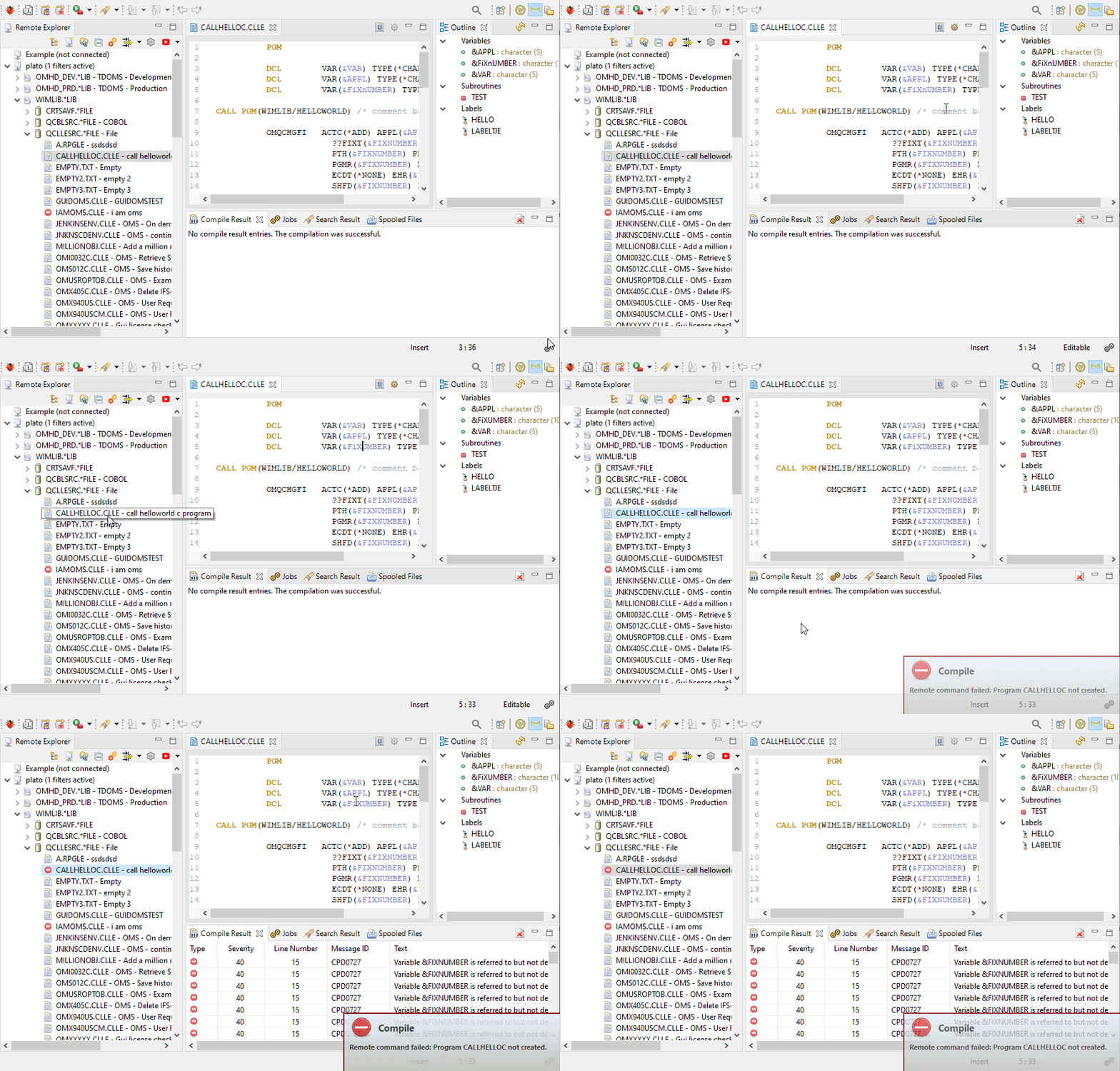
| E050 The compile results view now listens to selections | The compile results view now listens to selections in the remote explorer
|
|---|
Other issues
- E050 Allow for more than 1 compile at a time
- After the Properties view was closed, it would continue to throw errors when selecting elements in the explorer. This has been fixed.
- 00128 - Working with 2 LPARS/systems, MiW gets confused opening members
- We found and fixed an issue with lock registration while opening the same member on different systems.
- 00130 Expanding a source file expands a library that was collapsed
- We found and fixed an issue while expanding and collapsing libraries and source files in the remote explorer.
- 00129 - Failing search feature
- We found and fixed an issue with quoted strings. Please read the online help (F1) on how to specify search terms when using the grep command.
New and Noteworthy in MiWorkplace V1.29.0
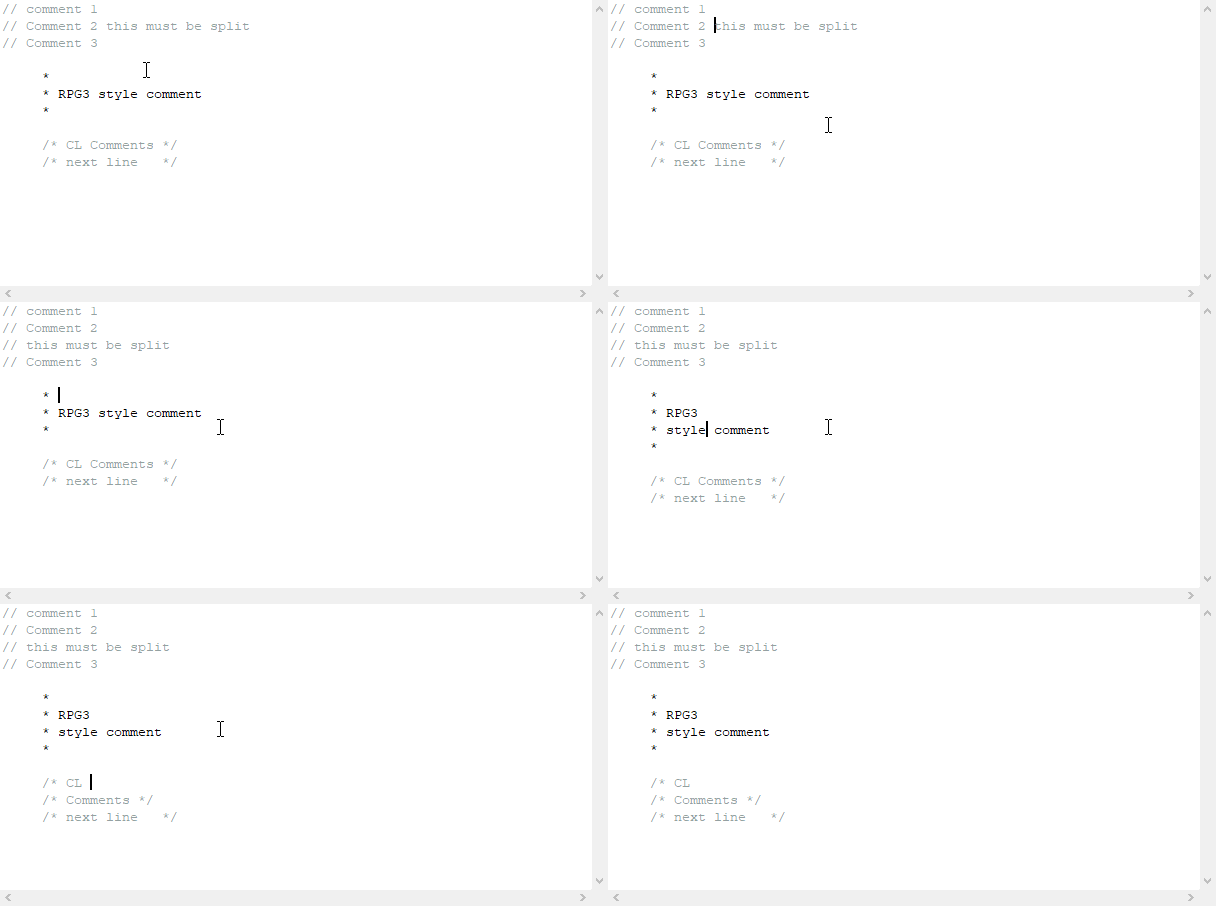
| E212 - Repeat comment characters | CTRL+ENTER will now examine if the current line is a comment line. If this is the case then the line will be split in a new comment line.
|
|---|
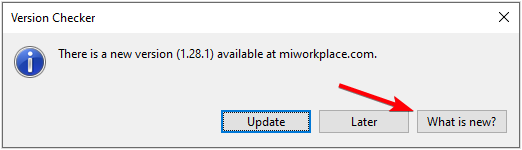
| Q012 - Provide details of changes in new revisions | A Whats new? button has been added to the version checker. It will bring you to the release notes page.
|
|---|
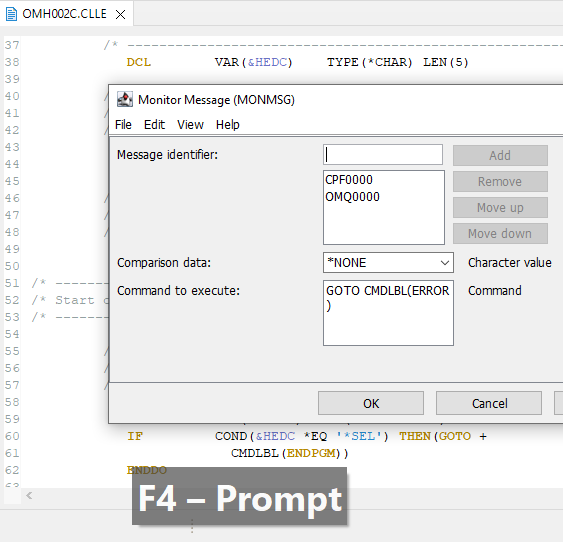
| E036 - ability to prompt source statements | Long overdue, but we have finally implemented prompting 🎉. The prompting behavior is the same as in the green screen.
|
|---|
| 00111 - Support Apple ARM (M1) technology | Support for Apple Silicon (ARM/M1) architecture was added. Downloads can be found here.
|
|---|
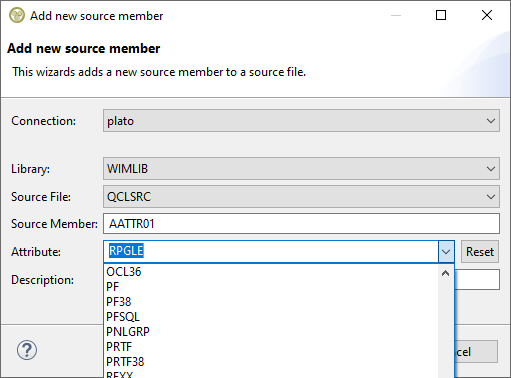
| E046 Add COBOL to list when right click add new member | The list of member types when adding a new member has been expanded. The last entered member type is now remembered and custom types are added to the list automatically. Manually added member types can be removed by resetting the list.
|
|---|
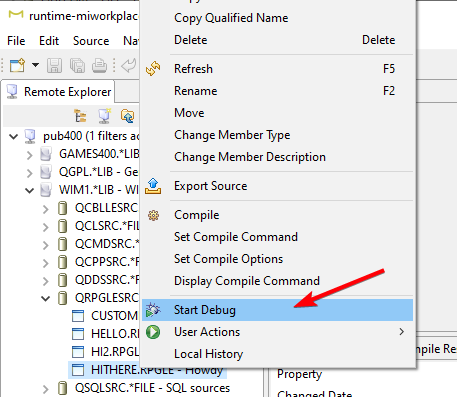
| E044 - Include debugging files with MiWorkplace | We now include the debugging framework. This was previously not possible due to licensing issues. A separate download is no longer required. Jus right-click and start your debug.
|
|---|
Other issues
- 00114 - Duplicate Search and History options
- When exiting the program abnormally, some menu entries were not removed from the menu and appeared as duplicate entries. This was fixed.
- 00123 - Member not refreshed when an attribute changes remotely
- When a member's attribute is changed remotely (e.g. CLLE) then it is not seen as a change when F5 is pressed on the member in MiWorkplace. This was fixed.
- 00112 Setting the library list fails silently
- If the library list could not be set then this would fail silently. Now a message box will show the reason for the failure.
- 00105 - Remote system is not created for pub400
- The remote system was not created for pub400 due to a regression that occurred after repressing the subsequent opening of the welcome page.
- 00121 - MiW is not using the correct compiler command.
- Some compile commands were not correctly filled in the new settings. Notably, CLP sources could not be compiled anymore. This was fixed.
New and Noteworthy in MiWorkplace V1.28.1
| 01728 - Problem saving IFS files with Miworkplace | After updating to version 1.28.0 saving of IFS files stopped working. This is a critical bug, therefore maintenance release 1.28.1 has been released. |
|---|
New and Noteworthy in MiWorkplace V1.28.0
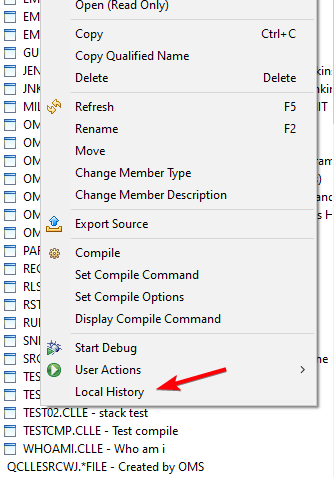
| 00104 - Recover from local history | A classic that has been refactored. If you have lost your source in some way, or if you want to roll back to a previous version, you can use the "Local History" to restore a previous version. Local versions are saved every time you save the remote member. So save often!
|
|---|
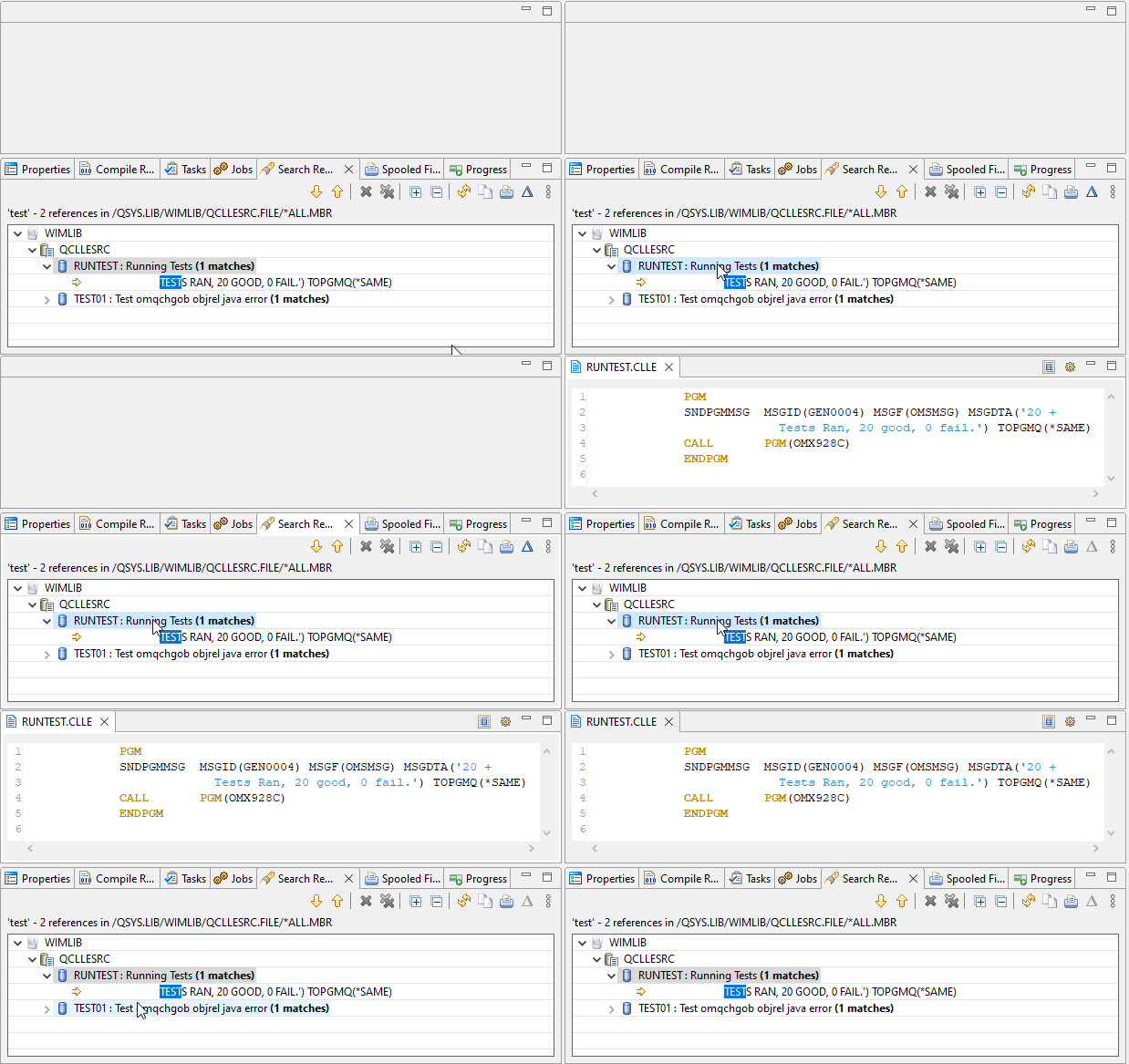
| E041 - Using remote search, allow double click on program name to open the member. | Double-clicking on the member did not open the member. Also clicking on the line for the first time, did not go to the line.
|
|---|
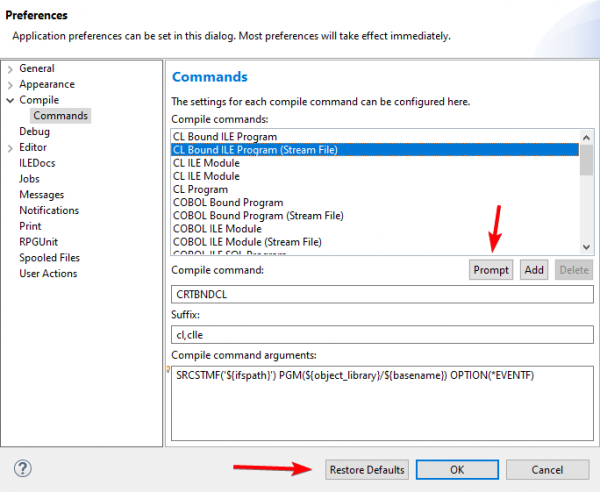
| E042 - Compilation improvements | The compile commands can now be prompted. Also the default compile set can be restored from the preferences. Lastly, the CTRL+SPACE completion in the prompt dialog was improved.
|
|---|
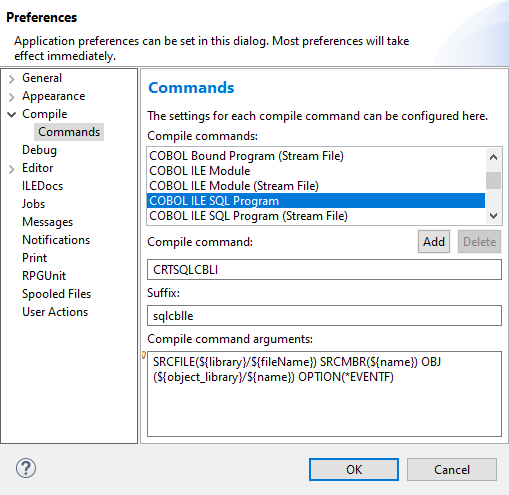
| E042 - Compile support for CBL and SQL | Default compile commands were added for Cobol and SQL. The commands can be customized in the MiWorkplace preferences.
|
|---|
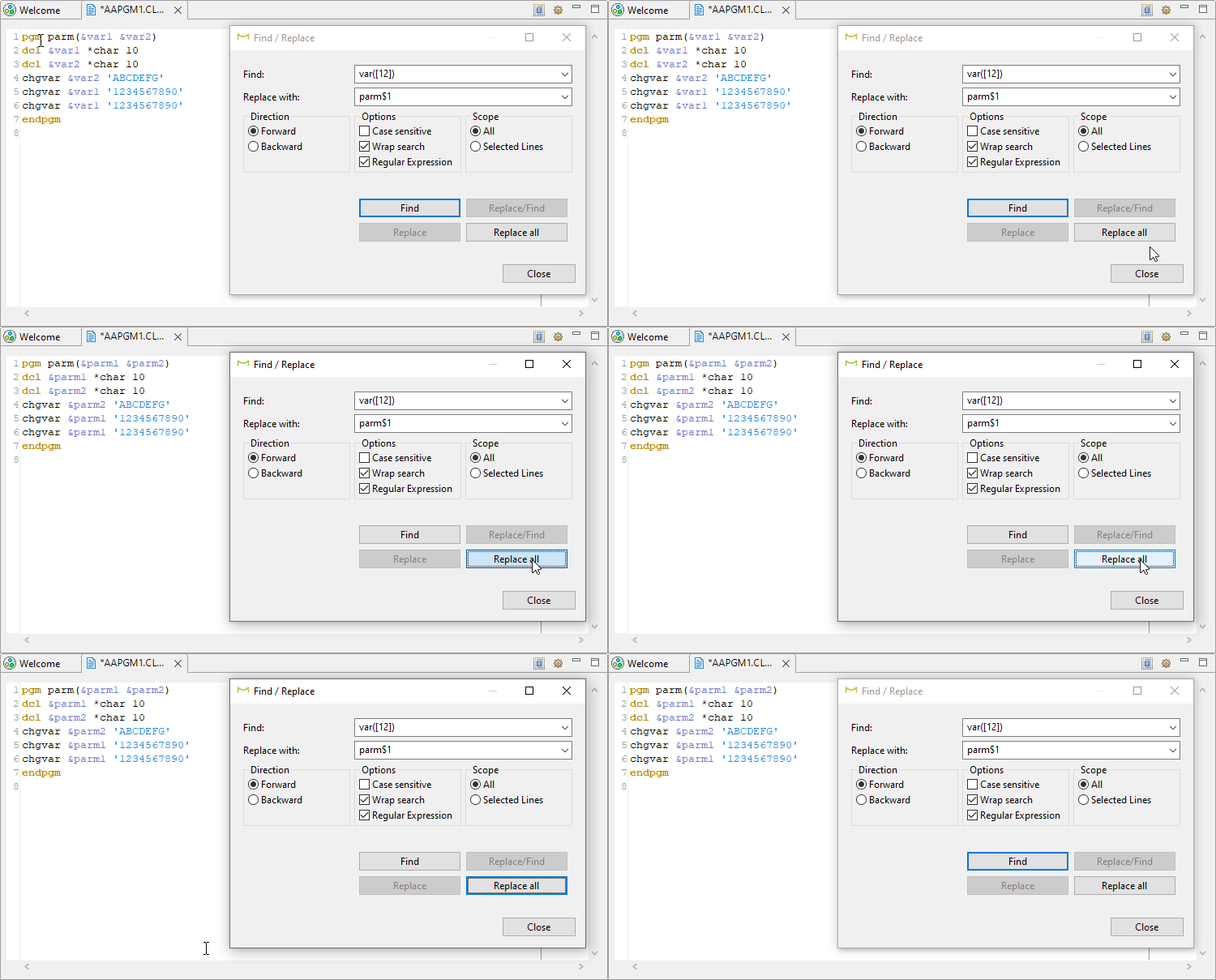
| E039 - Allow regular expression in search | the search dialog now supports regular expressions in the search and the replace text. Also a message is shown if the search term could not be found.
|
|---|
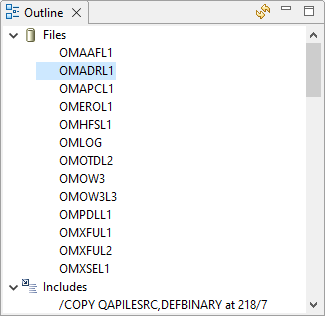
| 00098 - Add files to RPG outline | Files have been added to the fixed form outline.
|
|---|
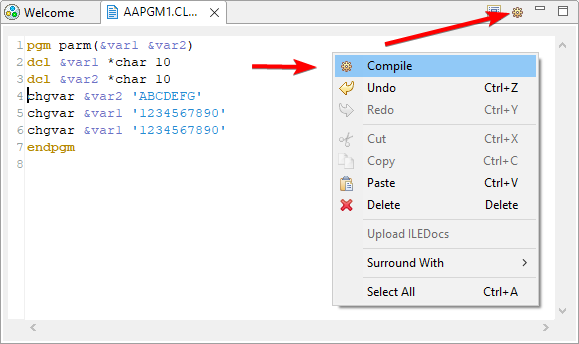
| E038 - Please add a compile button at the top of the screen | Compile can be activated with the context menu or toolbar item. Compile can always be triggered with the CTRL+SHIFT+C shortcut key.
|
|---|
Other issues/enhancements resolved
- 00105 - Remote system is not created for pub400
- The remote system was not created for pub400 due to a regression that occurred after not showing the welcome page anymore. This was fixed.
- E041 - Remote search, allow double click on program name to open the member
- Double-clicking on the filename in the remote search result would not open the member. This has been solved.
- E038 - Please add a compile button at the top of the screen
- This has been fixed
- 00097 - Select compile, the compile starts before the save is complete
- We found a regression where the compile did not wait for the save to complete. This has been fixed.
- 00093 - Outline does not work for lowercase h specs
- The outline view could get confused in some situations. This has been fixed.
- 00096 - When saving a member in a file with length 112, a truncation message is received.
- Trailing whitespace characters in a line could give a false truncate warning. This has been solved.
- 00095 - Outline in CLLE always expands after being collapsed
- The outline view would always expand in the CL editor. This has been fixed. If you collapse a tree node, it will not expand after something has been changed in the outline.
- 00027 - MiWorkplace CL syntax highlighting
- Some of the syntax highlighting in CL was not right. e.g. the DCL part of CRTBNDCL is treated as the DCL CL keyword. Similar issues with the PGM keyword within commands such as CRTSRVPGM and when part of a parameter value such as OBJTYPE(*PGM). This has been fixed.
- 00091 - MiW hangs when the host does not exist
- When the IP of the host does not exist, MiW hangs for a long time. Also, the context menu is then unusable because the connection is attempted again trying to evaluate the availability of an action. This was fixed by failing early and not trying a reconnect on a context menu action.
- 00090 - IFS filter does not allow > 10 directory names
- The directories filter did not allow directory filters larger than 10 positions
New and Noteworthy in MiWorkplace V1.27.0
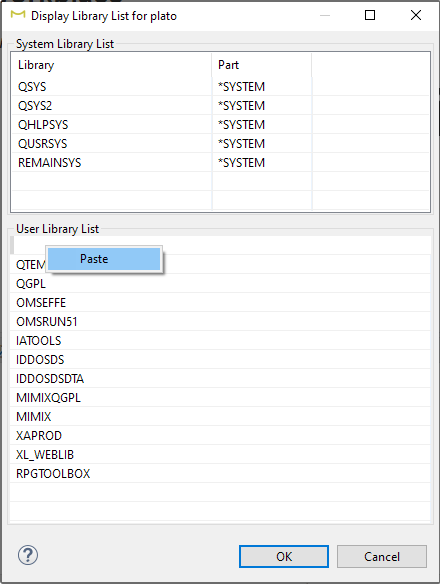
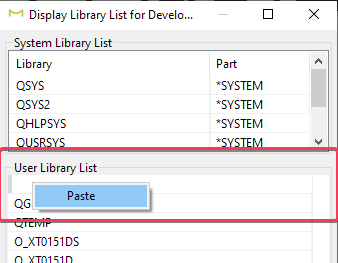
| E035 - Allow to paste the library list | The library list widget now makes it possible to paste the library list that was copied from the green screen. Do not use the PASTE shortcut (CTRL+V) but use the context menu.
|
|---|
Other issues/enhancements resolved
- 00084 - MiWorkplace - spool files
- The most recent spooled files would not show because of a mismatch between the users local date and the systems date
- 00085 - Can't reconnect after disconnect
- After disconnect, the system does not allow to log back in. This has been fixed.
- 00086 - Loop in logging when logging view open
- A log message was flooding the log. This has been fixed.
New and Noteworthy in MiWorkplace V1.26.0
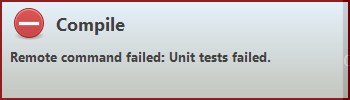
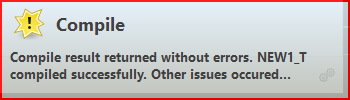
| 00068 - Unclear compilation failure messages | After compilation, especially with a user program, it is sometimes not clear if the compile failed or not.
The actual compile failure is now visible in the notification. Also, all messages are clearly logged in the error log, and the job log of the remote connection can be viewed from the connection. Below is an example of a user compile program that compiles a unit test and then runs it (and fails). The reason for the failure is shown in the first notification.
However, MiWorkplace thinks that the compile part succeeded because there are no records in the event file.
|
|---|
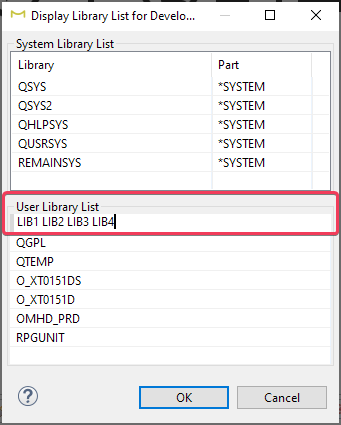
| E035 - Allow to paste the library list | A list of comma or space separated libraries can now be added in the entry field of the library list editor.
|
|---|
Other issues/enhancements resolved
- 00069 - Problems with remote search in German language
- Remote search does not work because the remote translation properties were not synchronized. This has been fixed.